The OSI (Open Systems Interconnection) Model is a conceptual framework that defines how two systems communicate through a layered architecture, where each layer has a distinct role and interacts only with its immediate neighbors.
It breaks complex network communication into seven manageable layers, making it easier for engineers to design, debug, and scale systems.
Why the OSI Model Matters in System Design
Whether you’re building distributed microservices, cloud applications, or IoT systems, understanding the OSI Model helps you:
- Visualize how data moves through a system, from physical hardware to software applications.
- Troubleshoot efficiently, by isolating which layer a failure or latency occurs in.
- Design scalable and interoperable systems, as each layer can evolve independently.
In interviews, this model often becomes a framework for explaining how data flows from user to server and back — a critical skill for backend, DevOps, and cloud engineers.
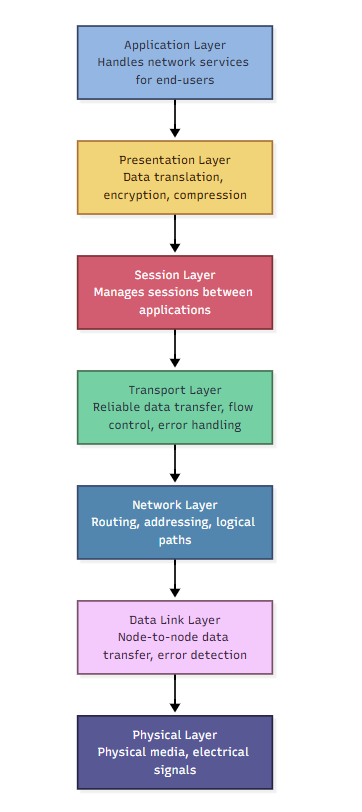
The 7 Layers of the OSI Model (With Examples)
Below is a breakdown of all seven layers, explained in professional but simple terms — with real-world examples and use cases you can mention in interviews.
Physical Layer
Purpose:
The Physical Layer deals with the actual transmission of raw bits (0s and 1s) over physical media like cables, fiber optics, or radio waves.
What It Does:
- Converts digital data into electrical, optical, or radio signals.
- Defines hardware standards such as cables, connectors, and voltage levels.
- Controls data rate and transmission mode (simplex, half-duplex, full-duplex).
- Handles network topologies like bus, star, and ring.
Real-World Examples:
- Ethernet cables (Cat5, Cat6)
- Fiber optics used in data centers
- Wi-Fi radio signals in wireless routers
- Repeaters and hubs used in signal boosting
In real life: When your Wi-Fi signal drops or a cable is unplugged, that’s a Physical Layer problem.
Data Link Layer
Purpose:
Ensures reliable node-to-node data transfer and handles error detection from the Physical Layer. It structures raw bits into frames.
What It Does:
- Detects and sometimes corrects transmission errors.
- Uses MAC addresses for local communication within a LAN.
- Controls which device can send data at a given time.
Real-World Examples:
- Ethernet (IEEE 802.3)
- Wi-Fi (IEEE 802.11)
- Switches and Network Interface Cards (NICs)
- ARP (Address Resolution Protocol) for resolving IP to MAC addresses
In real life: When you connect to a Wi-Fi access point or Ethernet switch, Data Link Layer decides “who talks when.”
Network Layer
Purpose:
Responsible for routing — determining how data packets travel from the sender to the receiver across multiple networks.
What It Does:
- Uses IP addresses for global delivery.
- Handles packet routing, fragmentation, and reassembly.
- Determines the best path using routing algorithms.
Real-World Examples:
- IPv4 / IPv6
- Routers and Layer 3 switches
- ICMP (used in ping and traceroute)
- Routing protocols like BGP and OSPF
In real life: When Google Maps reroutes you based on traffic, routers do the same thing — dynamically finding the best path for data.
Transport Layer
Purpose:
Provides end-to-end communication and ensures that data is delivered accurately, in order, and without loss.
What It Does:
- Segments data into smaller packets for transmission.
- Handles error detection, retransmission, and flow control.
- Uses port numbers to identify specific processes or services.
Real-World Examples:
- TCP (Transmission Control Protocol) for reliable delivery
- UDP (User Datagram Protocol) for fast, connectionless communication
- QUIC, used in HTTP/3 for faster web traffic
In real life: TCP ensures your banking transaction is accurate; UDP ensures your YouTube video doesn’t lag from over-checking packets.
Session Layer
Purpose:
Manages and maintains sessions — the ongoing exchange of information between applications.
What It Does:
- Establishes, maintains, and terminates sessions between devices.
- Handles synchronization and checkpointing.
- Restores sessions if connections are interrupted.
Real-World Examples:
- Session tokens in web authentication
- WebSocket connections
- Remote Procedure Calls (RPCs)
In real life: When your Zoom meeting reconnects after a short Wi-Fi drop, that’s Session Layer magic.
Presentation Layer
Purpose:
Ensures that data is readable and secure by managing formatting, encryption, and compression.
What It Does:
- Converts data between application formats (e.g., JSON, XML).
- Encrypts and decrypts sensitive data (TLS/SSL).
- Compresses large files to reduce bandwidth usage.
Real-World Examples:
- SSL/TLS encryption in HTTPS
- Serialization formats like JSON, XML, Protobuf
- Compression formats like GZIP, ZIP
In real life: When your browser shows a lock icon for HTTPS, Layer 6 is encrypting your data.
Application Layer
Purpose:
The topmost layer — it directly interacts with end-user applications and defines protocols for specific services.
What It Does:
- Provides network services like file transfer, email, and web access.
- Defines application-level protocols such as HTTP or SMTP.
- Manages user request/response flows.
Real-World Examples:
- HTTP/HTTPS (Web browsing)
- FTP, SMTP, DNS (File, email, and name resolution)
- REST and GraphQL APIs used in modern web applications
In real life: Every time you open Instagram or Gmail, you’re interacting with the Application Layer.
How Data Moves: Encapsulation and Decapsulation
Communication between systems happens through encapsulation — each layer adds its own header as data moves down the stack, and these headers are removed in reverse order during reception.
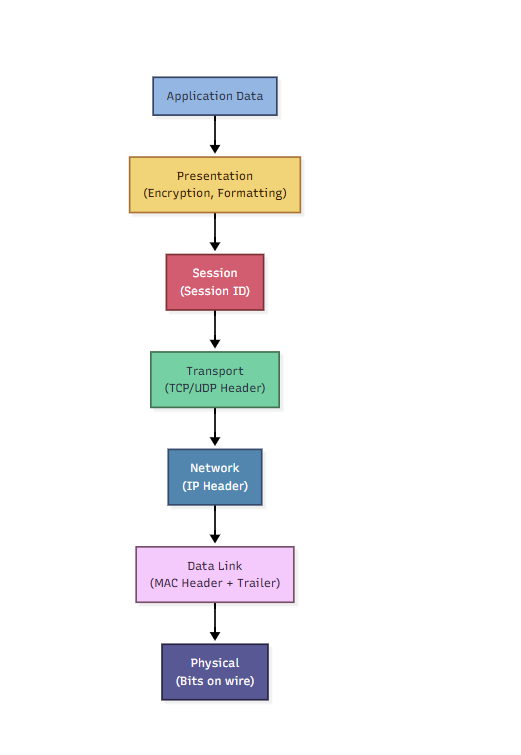
Think of it like a delivery service:
- Each layer wraps data like packaging an item.
- At the destination, the packaging is unwrapped layer by layer.
OSI Model vs. TCP/IP Model — Quick Comparison
| OSI Model Layer | TCP/IP Model Equivalent | Example Protocols |
|---|---|---|
| Application, Presentation, Session | Application | HTTP, FTP, TLS |
| Transport | Transport | TCP, UDP |
| Network | Internet | IP, ICMP |
| Data Link + Physical | Network Access | Ethernet, Wi-Fi |
Real-World Use in System Design
When building scalable systems:
- Layer 7 (Application): Load balancers distribute HTTP traffic.
- Layer 4 (Transport): Firewalls filter by port and protocol.
- Layer 3 (Network): CDNs route content from the nearest node.
- Layer 2 (Data Link): Switches connect microservices in a private subnet.
- Layer 1 (Physical): Redundant fiber connections improve reliability.
These principles guide network architecture, high availability, and fault tolerance design.
Conclusion
The OSI Model is not just an academic concept — it’s a mental blueprint for building, optimizing, and troubleshooting modern distributed systems.
From the physical hardware that carries signals to the application protocols that deliver content, every layer plays a critical role in ensuring that the digital world runs smoothly and reliably.
Mastering the OSI model helps engineers think systematically — and that’s exactly what great system designers and network architects do.