Airline Reservation System Project Using SpringBoot
The Airline Reservation System is a complete, full-stack Spring Boot web application that lets users search for flights, book tickets, pay online and receive their e-ticket by email, while administrators manage airports, flights, seats and customers from a dedicated panel. It is built to mirror how a real booking website works, which makes it an ideal final-year project, portfolio piece or hands-on way to learn Spring Boot, Spring Security and JPA in one go.
In this guide we walk through the project end to end: what it does, how the booking flow works, the three user roles, the technology stack and architecture, and exactly what you need to run it on your own machine.
Spring Boot is one of the most trending frameworks in the current industry. This project provides you with all the basic level features, which are available in real-time scenarios.
We have used multiple technologies in this project. So it is a great opportunity for you to learn new technologies.
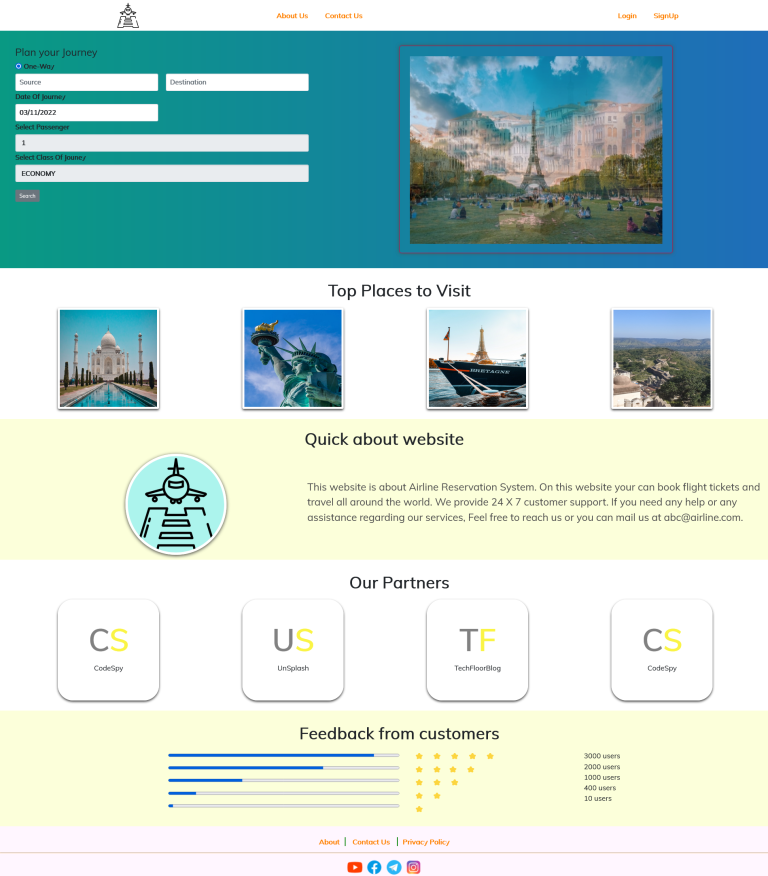
The airline reservation system project is about flight ticket booking. You will get the option to search flights using source and destination.
Then you can select one flight from the search result and you can book the ticket. You will get the ticket to your email address after a successful booking.
We have multiple roles in the project. These roles are discussed below. And we are using java 8 in this project.
Java 8 is a long-term support (LTS) release that is still widely used in enterprise codebases, which makes it a safe, well-documented version to learn on. To see the project in action, you can watch the video.
Let’s discuss the technology we have used to develop this project. If you like this kind of hands-on build, our Bus Ticket Booking System and Online Hotel Booking System projects follow a similar Spring Boot architecture.
Key Features at a Glance
- Flight search by source and destination, with a results list to compare and pick a flight.
- Ticket booking with traveller details, email and phone number captured during checkout.
- Secure login with role-based access for customers and administrators using Spring Security.
- Online payment step for credit and debit cards as part of the booking flow.
- PDF e-tickets generated automatically and sent to the customer by email.
- Booking history so customers can view their past and upcoming trips.
- Admin panel to manage airports, flights, seats, customers and all bookings, including locking and unlocking user accounts.
- MySQL 8 database that runs locally or on AWS RDS in the cloud.
What This Airline Reservation System Project Includes
Technology stack
Front End
- Html (Some components developed using HTML5)
- CSS
- JavaScript
- Jquery
- Bootstrap
- JSP
- Spring Freemarker for some custom templates
Backend Logic
- Java 8
- Maven
- Spring Boot
- Spring Security For Authentication & Authorization
- Spring Session Management
- Email Functionality
- PDF Functionality
- Hibernate
- JPA
- MySQL 8 On Localhost as well as Cloud (AWS :- RDS)
Server
- Tomcat
IDE
- STS (Spring Tool Suite 4.xx.xx) (Recommended)
- Visual Studio Code (Optional)
Project Demo
User Roles and Permissions
The application has three roles. Each one unlocks more of the system, and Spring Security enforces what each role can see and do.
- Public
- Customer
- Admin
Public (guest) users
- Public user does not need to be authenticated.
- Public can search for flight.
- Public can see the flight search result.
- Public can select any flight.
- Public can add traveler details as well as email id and phone number.
Customers
- Customer can perform all the public activities.
- After adding traveler details user must be authenticated as a Customer.
- Customer can do payment activities through Credit/Debit card.
- Customer can download ticket as a pdf.
- Customer can see its booking history.
Administrators
- To perform admin activities, user must be authenticated with admin role.
- Admin can add/update/delete customer details.
- Admin can lock or unlock user.
- Admin can add/update/delete airport details.
- Admin can update flight details. (Update)
- Admin can update/delete seat details.
- Admin can see the full ticket booking history.
- Admin can delete ticket booking history.
How the Booking Flow Works
From a traveller’s point of view, booking a ticket takes a handful of steps:
- Search – the user enters a source and destination and sees the matching flights.
- Select – they choose a flight from the results.
- Add traveller details – passenger information, email address and phone number.
- Sign in – before payment, the user must log in or register as a customer, so every booking is tied to an account.
- Pay – the customer completes payment with a credit or debit card.
- Get the ticket – a PDF ticket is generated, emailed to the customer and stored in their booking history.
Letting guests search and pick a flight before forcing a login mirrors how real airline websites reduce friction: users only create an account once they have decided to buy.
Application Architecture
The project follows the classic layered architecture used in most production Spring Boot applications, which keeps responsibilities clearly separated and easy to follow:
- Presentation layer – JSP views with HTML, CSS, Bootstrap, JavaScript and jQuery, plus FreeMarker templates for some custom pages and emails.
- Controller layer – Spring MVC controllers that handle each request, validate input and decide which view or response to return.
- Service layer – the business logic: searching flights, creating bookings, handling payments, generating PDF tickets and sending emails.
- Persistence layer – Spring Data JPA repositories with Hibernate mapping Java entities to MySQL tables.
- Security layer – Spring Security for authentication, role-based authorisation and session management.
Core Modules
Behind the scenes, the application is organised around a few core modules that match what the admin panel manages:
| Module | What it handles |
|---|---|
| Airports | The list of airports used as flight sources and destinations |
| Flights | Routes, schedules and details shown in search results |
| Seats | Seat availability and configuration for each flight |
| Bookings | Ticket reservations, traveller details and booking history |
| Customers and users | Accounts, roles and the ability to lock or unlock a user |
Requirements to Run the Project
- Java 8. Make sure the same version is installed in your system. If you want to know more about installation, then you can watch this video.
- Maven 3.5 or greater. Since it is a Spring boot project so maven or Gradle is required. Maven is a project management tool. It is used to manage your project through pom.xml. You can watch this video to configure it in your system.
- Spring tool suite IDE is required. STS is the standard version of eclipse. The interface is the same in both these IDE. But STS is designed for spring projects. You can watch this video to install the spring tool suite ide in your system.
- Mysql 8 is required. Most of us do mistakes in MySQL installation. Whenever you install MYSQL, make sure that you are installing a full setup. I will suggest, installing it through MySQL installer. If the full setup is not there, then you cannot run this project.
How to Run the Project Locally
Once Java 8, Maven, Spring Tool Suite and MySQL 8 are installed, getting the project running usually takes a few minutes:
- Import the project into Spring Tool Suite as an existing Maven project and let Maven download the dependencies.
- Create the MySQL database for the project using MySQL Workbench or the command line.
- Open
application.propertiesand set your database URL, username and password, plus the email settings used to send tickets. - Run the main Spring Boot application class, which starts the embedded Tomcat server.
- Open the application in your browser on the configured port and start searching for flights.
If anything does not work during setup, the setup support included with the project covers it.
What You Will Learn From This Project
- Building a complete web application with Spring Boot and Spring MVC.
- Securing an application with Spring Security, login and role-based access control.
- Modelling a real domain with JPA and Hibernate on top of MySQL.
- Generating PDF documents and sending transactional emails from Java.
- Structuring code into controller, service and repository layers the way teams do in industry.
- Deploying a database to the cloud using AWS RDS.
What You Get When You Buy the Project
- Source Code
- Support in Project Setup
- Support if some feature is not working.
Price:- ₹999
Contact Details:-
WhatsApp:-https://wa.me/qr/62AJACU7NG2OH1
Contact form:- codespy.org/contact-us
Frequently Asked Questions
Is this project suitable as a final-year project?
Yes. It covers authentication, role-based access, a full booking workflow, payments, PDF generation, email and a database, which is the breadth most colleges expect from a final-year web project.
Can I run it on a newer Java version?
The project is built and tested on Java 8, so that is the recommended version. Running it on newer Java versions may require upgrading Spring Boot and some dependencies.
Do I need AWS to run it?
No. MySQL 8 on your own machine is enough. AWS RDS is optional and only needed if you want to host the database in the cloud.
What happens if I get stuck during setup?
Setup support is included with the project. Reach out on WhatsApp or through the contact form and we will help you get it running.