The Gemini 4 Argon Price Increase Playbook: Cut Your API Bill Before 1 December
Gemini 4 Argon price increase starts 1 December 2026. Measure your real cost per request, forecast the bill and cut it with Batch and thinking limits.
Picture a backend engineer named Arjun at a Bengaluru fintech. He is halfway through his chai when the Slack message lands: “Finance wants the Gemini 4 Argon bill forecast by Friday. Does the price really double in December?” He pointed the support-summary service at the new model two weeks ago. It works beautifully. Nobody has looked at the invoice.
It does double. This Gemini 4 Argon price increase playbook is the plan Arjun follows to find out what his service really costs per request, cut that number before 1 December, and set an alert so the surprise never repeats. You can follow it with any service that calls the model.
Last verified: 26 October 2026. AI tools and prices change fast; check the linked sources for anything newer.
Who this playbook is for: developers and tech leads already calling (or about to call)
gemini-4-argonfrom production code. By the end you will have a measured cost per request, a December forecast, and a short list of changes that lower the bill. Time needed: about 45 minutes.
Why the Gemini 4 Argon price increase matters now
Google released Gemini 4 Argon (gemini-4-argon) in October 2026 and describes it on its model page as its flagship reasoning model for complex software engineering, math and science, multi-step agents and long decode. The docs list a 1,048,576-token context window and up to 65,536 output tokens by default.
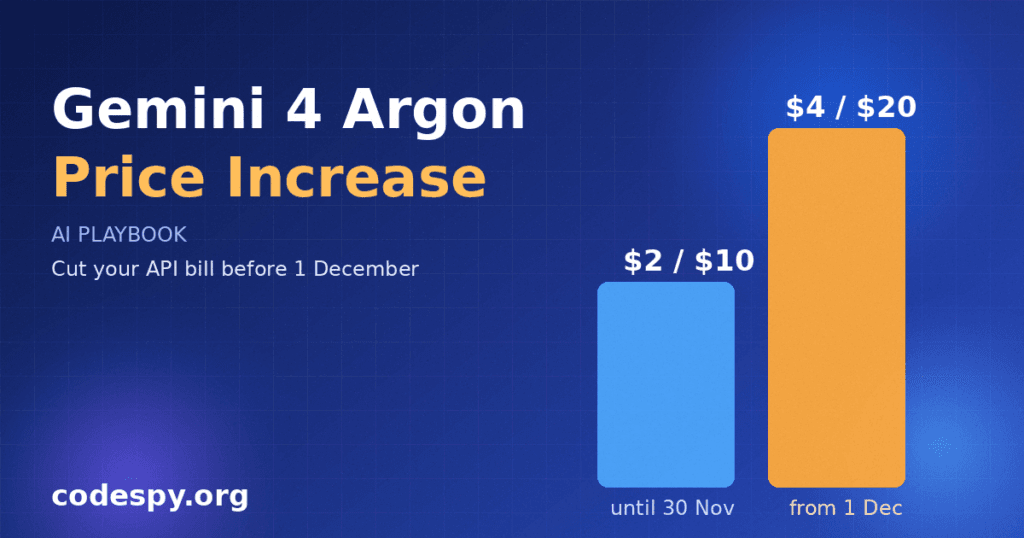
The part that affects your budget sits on the Gemini API pricing page. On the standard paid tier, input costs $2.00 per million tokens and output (thinking tokens included) costs $10.00 per million through 30 November 2026. From 1 December 2026 those become $4.00 and $20.00. Argon is not available on the free tier.
In plain terms: the launch price is an introductory rate. Anything you build and size today at $2 and $10 will cost twice as much in five weeks unless you change how you call the model.
The playbook at a glance
- Play 1: Measure the real token usage of one request
- Play 2: Turn tokens into dollars with a cost calculator
- Play 3: Forecast the December bill
- Play 4: Move non-urgent work to Batch or Flex
- Play 5: Cap thinking and trim the prompt
- Play 6: Add a budget alert and a weekly check
Play 1: Measure the real token usage of one request
Goal: know how many input, output and thinking tokens a typical call uses, because the price list is meaningless without them.
- Pick one production-like prompt, not a toy example.
- Call the model with the REST API and read the
usageMetadatablock in the response. - Record
promptTokenCount,candidatesTokenCountandthoughtsTokenCount. Output is billed including thinking tokens, so add the last two.
curl -s "https://generativelanguage.googleapis.com/v1beta/models/gemini-4-argon:generateContent" \
  -H "x-goog-api-key: $GEMINI_API_KEY" \
  -H "Content-Type: application/json" \
  -d '{"contents":[{"parts":[{"text":"Summarise this support ticket in 3 bullets: ..."}]}]}' \
  | jq '.usageMetadata'
Say Arjun runs twenty real tickets through it and the average comes out at 1,800 input tokens and 2,600 output tokens, most of the output being thinking. The visible summary is tiny, but the bill follows the thinking. (These numbers are illustrative; yours will differ.)
Done when: you have an average input and output token count from at least 20 real requests.
Play 2: Turn tokens into dollars with a cost calculator
Goal: a small function everyone on the team can run before and after a change.
# prices per 1M tokens, standard paid tier, from the Gemini API pricing page
PRICES = {
    "intro": {"in": 2.00, "out": 10.00},   # through 30 Nov 2026
    "dec":   {"in": 4.00, "out": 20.00},   # from 1 Dec 2026
}

def cost_usd(input_tokens, output_tokens, period="intro"):
    p = PRICES[period]
    return (input_tokens * p["in"] + output_tokens * p["out"]) / 1_000_000

if __name__ == "__main__":
    for period in PRICES:
        print(period, round(cost_usd(1800, 2600, period), 5))
With Arjun’s example numbers the result is about $0.0296 per request now and $0.0592 from December. It looks small until you multiply it by volume.
Done when: the script prints a per-request cost for both periods and the numbers match a hand calculation.
Play 3: Forecast the December bill
Goal: give finance one number with the assumptions visible.
- Take monthly request volume from your logs, not from guesses.
- Multiply by the per-request cost for the December column.
- Add 20 percent headroom for retries and growth, and write the assumption next to the number.
If Arjun’s service handles roughly 400,000 requests a month, then at $0.0592 each that is about $23,700 a month in December, against about $11,800 under the introductory rate. Plug in your own figures.
Done when: finance has a forecast with the volume, token averages and price date written on it.
Play 4: Move non-urgent work to Batch or Flex
Goal: pay half price for work nobody is waiting on.
The pricing page lists Batch and Flex tiers for Argon at $1.00 input and $5.00 output per million tokens through 30 November, rising to $2.00 and $10.00 on 1 December. That is half the standard price in both periods. Priority is the opposite: $3.60 and $18.00 now, $7.20 and $36.00 from December.
- List every call site and mark it as user-waiting or background.
- Move background jobs (nightly summaries, tagging, evals, report generation) to the Batch API.
- Try Flex for work that can tolerate slower, less predictable responses, and read the docs for its current latency behaviour before switching.
Suppose two of Arjun’s three call sites are nightly jobs. Moving them to Batch halves their cost without touching a single prompt.
Done when: each call site is labelled and every background job runs on the cheaper tier.
Play 5: Cap thinking and trim the prompt
Goal: stop paying for reasoning you do not need.
Argon supports three thinking levels: low, medium and high. Because thinking tokens are billed as output, the level is a cost dial. Test your task at each level against a small set of known-good answers and keep the lowest level that still passes.
- Build 20 to 30 test cases with expected outcomes.
- Run them at low, medium and high and record accuracy and tokens.
- Pick the cheapest level that meets your quality bar and set it explicitly in the request.
- Trim system prompts and drop repeated context; input tokens cost money on every call.
Argon supports implicit caching only; explicit caching is not available. Cached input is priced at $0.10 per million through November and $0.20 from December, so keep stable instructions at the start of the prompt and variable content at the end to give implicit caching a chance to work. Whether a given request gets a cache hit is up to the service, so check usageMetadata for cached token counts.
Done when: you have a table of thinking level versus accuracy versus cost, and the chosen level is set in code.
Play 6: Add a budget alert and a weekly check
Goal: make sure nobody learns about cost from an invoice.
- Log the three token counts for every request alongside a feature name.
- Set a billing budget alert in your Google Cloud or AI Studio billing settings at 50, 80 and 100 percent of the forecast.
- Put a 15-minute cost review in the team calendar every week until January.
Done when: a test alert has fired to a channel people actually read.
Should you stay on Argon? A decision table
| Situation | Suggested move | Why |
|---|---|---|
| User-facing, hard reasoning tasks | Stay on Argon, standard tier, tuned thinking level | Quality matters more than the per-call price |
| Nightly or bulk jobs | Argon on Batch | Half the standard price |
| Simple classification or extraction | Test a cheaper model | Reasoning flagship is likely overkill |
| Latency-critical, revenue-linked | Priority tier only if the SLA needs it | Priority costs 1.8 times the standard rate |
| Low volume or prototype | Stay as is | December still costs little at small scale |
Check your own model alternatives against their current price pages; this table only uses figures from the Argon pricing page.
Pitfalls to avoid
- Forgetting thinking tokens. They are billed as output. Always read
thoughtsTokenCount. - Sizing from the intro rate. Forecast with the December column, not today’s.
- Assuming explicit caching. Argon supports implicit caching only, so do not build around a cache you control.
- Using Priority by default. It is the most expensive tier; reserve it for calls that truly need it.
- Testing on toy prompts. Short demos under-report tokens. Use real traffic samples.
- Trusting third-party price blogs. Several summaries differ on dates. The official pricing page is the source of truth.
How to measure success
- Cost per request, tracked weekly, compared with the Play 2 baseline.
- Share of tokens served through Batch or Flex.
- Average thinking tokens per request after tuning.
- Quality score on your fixed test set, so savings do not hide regressions.
- Actual monthly spend versus the Play 3 forecast.
Your checklist
- ☐ Measured tokens on 20 real requests
- ☐ Ran the cost calculator for both price periods
- ☐ Sent finance a December forecast
- ☐ Moved background jobs to Batch
- ☐ Tested low, medium and high thinking
- ☐ Set budget alerts and a weekly review
Frequently asked questions
When does the Gemini 4 Argon price go up?
According to Google’s pricing page, the introductory rates apply through 30 November 2026, and the higher rates start on 1 December 2026.
Is Gemini 4 Argon free to use?
No. The pricing page states it is not available on the free tier, so you need a paid tier API key.
Do thinking tokens count toward the bill?
Yes. The pricing page lists output price as including thinking tokens, so a short visible answer can still be expensive.
Can I use explicit context caching with Argon?
No. The model page and pricing page both say caching is implicit only. Cached input is priced lower than normal input when it applies.
Can I call it from a Java or Spring app?
The API is plain REST, so any Java HTTP client works. I have not verified Argon-specific support in Spring AI releases, so check the Spring AI docs for the model ID before relying on a starter. Our Spring AI agent tutorial shows the general pattern for wiring a model into a Spring service.
What Arjun did next
By Friday Arjun sends finance a one-page forecast, the nightly jobs are already on Batch, and a budget alert pings the team channel at 50 percent. The December bill is still higher than October’s, but it is a number everyone agreed to in advance. His next action is a 30-minute test of the lowest thinking level on the summary task. Yours can be the same: run Play 1 on one real request today.
If you are building tools around the model, our guides on building an MCP server with Spring AI and your first RAG app with Spring AI pair well with the cost habits above, since retrieval size drives input tokens directly.
Sources: Gemini API pricing; Gemini 4 Argon model page; eesel.ai pricing breakdown (secondary).